Technical Documents
Specifications
Brand
WagoProduct Type
PLC Programming Software
For Use With
IO Module
Standards/Approvals
No
Country of Origin
Germany
Product Details
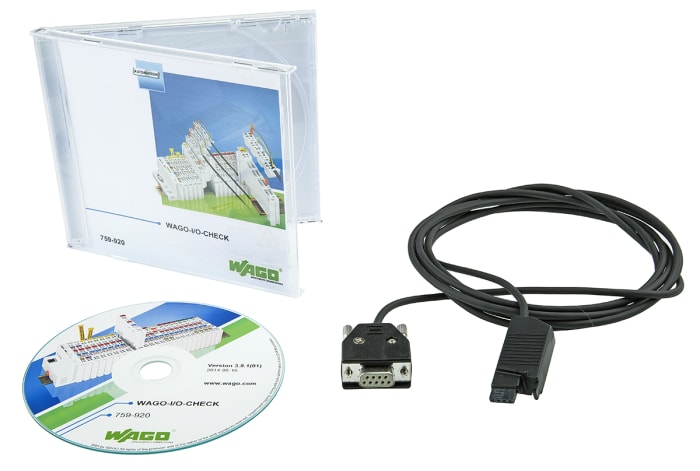
WAGO-I/O-CHECK is an easy-to-use Windows application for operating and displaying a WAGO-I/O-SYSTEM 750 node without connecting the node to a fieldbus system.
The software reads the configuration from the node and displays it as an on-screen graphic. The graphic can be printed together with a configuration list as documentation.
With WAGO-I/O-CHECK, it is possible to display and determine the process data of the bus modules. The field wiring, including all sensors and actuators, can thus be checked before startup.
Application-specific settings, such as the baud rate or sensor types, can be made with select interface, Pt100 and thermocouple modules. For communicating between WAGO-I/O-CHECK and the node, the coupler must be connected at a PCs vacant serial or USB port using the communication cable supplied in the kit with the system.
Stock information temporarily unavailable.
125.179 OMR
125.179 OMR Each (ex VAT)
131.438 OMR
131.438 OMR Each (inc. VAT)
1
125.179 OMR
125.179 OMR Each (ex VAT)
131.438 OMR
131.438 OMR Each (inc. VAT)
Stock information temporarily unavailable.
1
Technical Documents
Specifications
Brand
WagoProduct Type
PLC Programming Software
For Use With
IO Module
Standards/Approvals
No
Country of Origin
Germany
Product Details
WAGO-I/O-CHECK is an easy-to-use Windows application for operating and displaying a WAGO-I/O-SYSTEM 750 node without connecting the node to a fieldbus system.
The software reads the configuration from the node and displays it as an on-screen graphic. The graphic can be printed together with a configuration list as documentation.
With WAGO-I/O-CHECK, it is possible to display and determine the process data of the bus modules. The field wiring, including all sensors and actuators, can thus be checked before startup.
Application-specific settings, such as the baud rate or sensor types, can be made with select interface, Pt100 and thermocouple modules. For communicating between WAGO-I/O-CHECK and the node, the coupler must be connected at a PCs vacant serial or USB port using the communication cable supplied in the kit with the system.